
Appearance
MCP Servers
See also: MCP Client Setup, MCP Tool Access, Identity and Access, Admin Control Plane, MCP Registry and Discovery
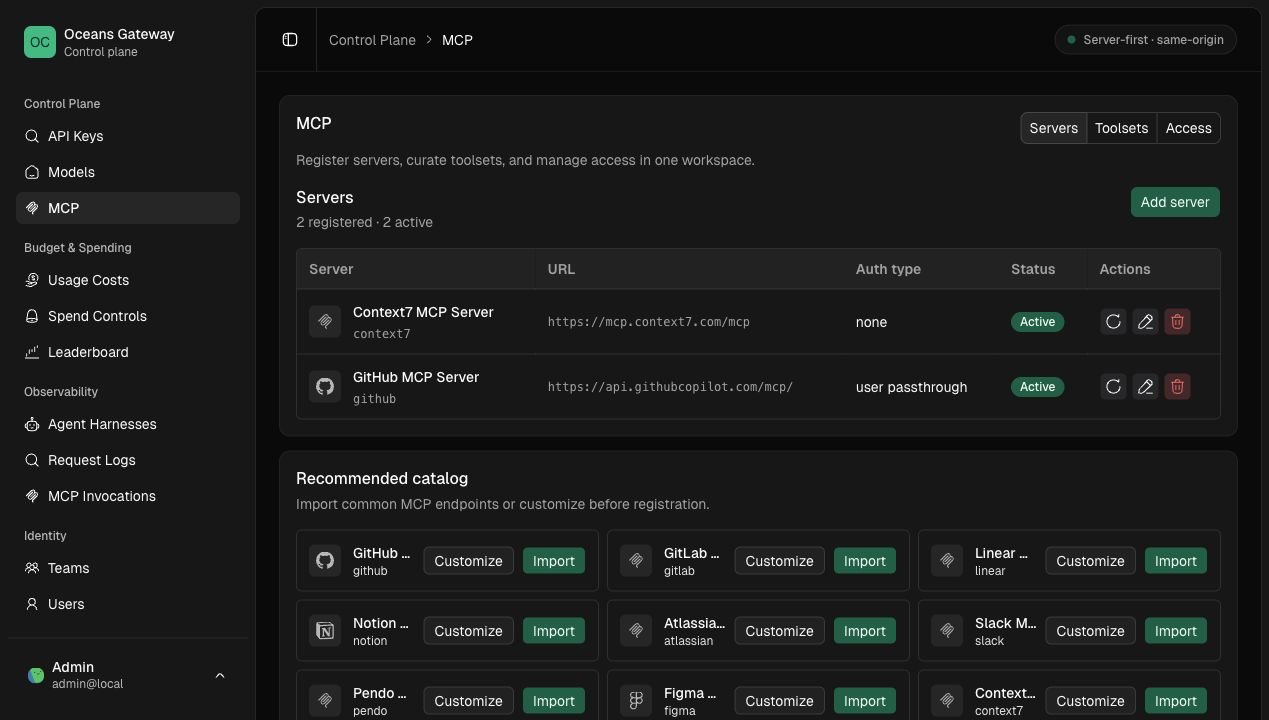
Oceans can register external Streamable HTTP MCP servers and expose them to MCP clients through two gateway data-plane routes:
text
/mcp
/mcp/{server_key}
/mcp is the aggregate endpoint. It exposes search_tools, describe_tool, and call_tool over the caller's granted active tools across all registered servers.
/mcp/{server_key} is the direct proxy endpoint. The gateway authenticates the caller with an Oceans API key, looks up the active registered server, applies any gateway-managed upstream credential, and proxies the MCP Streamable HTTP request to the registered server URL.
Discovered tools are not automatically callable. Configure explicit MCP tool or toolset grants before clients can see tools in tools/list or call them with tools/call; see MCP Tool Access.
Add a Server
Platform admins manage servers in the admin UI:
text
/admin/mcp/serversThe Servers tab is the registry workspace. It separates durable server records from the recommended catalog so admins can see exactly which upstreams are registered and which entries are only suggestions.
The page supports:
- importing a recommended catalog entry
- adding a custom Streamable HTTP server
- editing display name, URL, auth mode, auth config, and timeout
- disabling a server
- refreshing discovery
- opening a server detail dialog to inspect overview, configuration, discovered tools, and credential bindings
The corresponding admin API surface is documented for maintainers in MCP Registry and Discovery.
View Discovered Tools
Open a server from the Servers table, then use the Tools tab in the detail dialog.
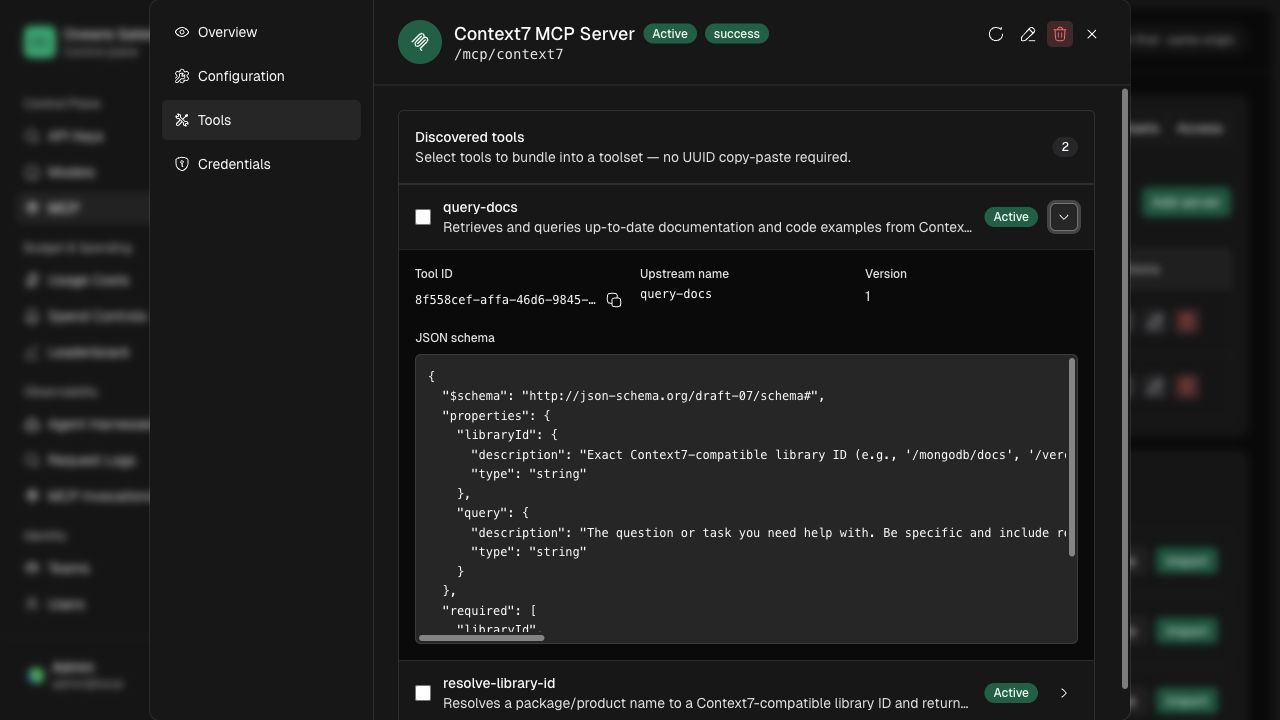
Each discovered tool row is collapsed by default. The collapsed row shows:
- selector checkbox
- tool name
- description, truncated when long
- active/inactive status
Expand a row to inspect:
- stable Oceans tool id
- upstream tool name
- schema version
- persisted JSON input schema
The JSON schema is the contract that describe_tool returns for aggregate MCP clients and the schema that direct tools/call requests are checked against. Schema hashes remain part of the backend drift contract, but the admin UI keeps the row focused on the values humans need when selecting tools.
When one or more active tools are selected, use Add to toolset to move to the Toolsets workflow with those tools preselected. Inactive tools remain visible for audit and drift review, but they cannot be selected or called.
Recommended Catalog
Recommended entries are curated shortcuts for common MCP servers. They are not tenant records, do not imply access, and are never executed until an admin imports or customizes them into a registered server.
Use Import when the catalog defaults are acceptable. Use Customize when you need to review or change the key, URL, auth mode, timeout, or display name before registration.
Server Keys
server_key is the public namespace used in direct /mcp/{server_key} URLs and aggregate tool addresses such as mcp://github/tools/issues.create.
Rules:
- 3 to 64 characters
- lowercase letters, digits, hyphen, and underscore
- stable once clients are configured
- unknown or disabled servers return not found
Auth Modes
Supported stored auth modes are:
none: no upstream credential is added.gateway_static_header: the gateway adds one configured upstream header.gateway_bearer_token: the gateway adds an upstreamAuthorization: Bearer ...header.user_passthrough: resolve a caller-owned user/service-account/team credential binding at execution time.oauth_obo: resolve and refresh a user-owned OAuth credential at execution time.
Discovery normally uses none, gateway_static_header, or gateway_bearer_token. An oauth_obo server can set auth_config.discovery_auth to none when its upstream permits public initialize and tools/list requests. Execution still requires a user OAuth connection.
Google Workspace OAuth
Google Drive and Google Docs are separate upstream MCP servers. Oceans can expose both through one aggregate /mcp endpoint. The client harness authenticates to Oceans with an Oceans API key. It does not receive a Google token, Google client secret, or Google callback URI.
Use Google's Drive MCP guide and Workspace MCP guide when you configure the Google Cloud project and consent screen.
Complete these Google Cloud steps before you enable the Oceans connection page:
- Join the Google Workspace Developer Preview when Google requires it for the selected account or project.
- Enable the Drive API, Docs API, Drive MCP API, and Docs MCP API in the same Cloud project.
- Configure the OAuth consent screen, audience, test users, and the two read-only scopes used below.
- Create a Web application OAuth client and register the exact Oceans callback URI.
- Publish or verify the consent application as required for the audience and restricted scopes.
Configure one Google confidential OAuth client in gateway configuration:
yaml
mcp:
  oauth:
    public_base_url: https://gateway.example.com
    providers:
      - key: google
        provider_type: google
        client_id: env.OCEANS_MCP_OAUTH_GOOGLE_CLIENT_ID
        client_secret: env.OCEANS_MCP_OAUTH_GOOGLE_CLIENT_SECRET
Register this exact callback URI in the Google OAuth client:
text
https://gateway.example.com/api/v1/mcp/oauth/google/callbackThe recommended Drive and Docs catalog entries set the provider key, OAuth resource, read-only scope, and public discovery mode. Drive requests drive.readonly. Docs requests only documents.readonly for read_doc. A harness can use the separate Drive tools to find a document, then pass its ID to Docs.
After an admin imports both entries and completes discovery, each user opens /admin/account/connections and grants access separately for Drive and Docs. Oceans uses authorization code flow with PKCE and the OAuth resource parameter. It stores the access and refresh tokens in the existing encrypted user credential binding. It refreshes the access token five minutes before expiry and requires a new connection after Google revokes the grant.
The harness must use an Oceans API key owned by that user to resolve the user's Google bindings. Service-account keys do not borrow user credentials. They require a separately managed service-account or team binding.
Disconnecting a server revokes its Oceans binding at once, but it does not call Google's token revocation endpoint. Google revocation removes the grant for the whole Cloud project and can invalidate both Drive and Docs tokens that use the same OAuth project. A user who wants to remove all project access can revoke the application from Google Account settings. Oceans then reports credential_required for each affected server.
Use read-only tools for the first toolset:
- Drive:
download_file_content,get_file_metadata,get_file_permissions,list_recent_files,read_file_content, andsearch_files - Docs:
read_doc
Do not add Drive copy_file or create_file, or Docs update_doc, to a read-only toolset. OAuth scopes remain the main permission boundary, but a narrow toolset gives callers a clear contract.
Google classifies drive.readonly as a restricted scope. An external production application can require Google verification and a security assessment. Confirm the current Google requirements before production rollout.
Workspace content is untrusted model input. Keep the write tools disabled for the first toolset, review tool grants, and apply the prompt-injection controls in Google's Workspace MCP security guidance.
Gateway-Managed Upstream Credentials
Gateway-managed credentials are for the upstream MCP server only. They are not caller credentials and are never returned to admin UI clients.
For gateway_static_header:
json
{
  "header_name": "X-API-Key",
  "secret_ref": "env/OCEANS_MCP_DISCOVERY_EXAMPLE_KEY"
}
For gateway_bearer_token:
json
{
  "secret_ref": "env/OCEANS_MCP_DISCOVERY_EXAMPLE_TOKEN"
}
Credentialed modes require an HTTPS server_url. Secret references must use env/OCEANS_MCP_DISCOVERY_*. The environment variable is resolved by the gateway process during discovery and proxying.
Inbound Oceans credentials are always stripped before forwarding upstream. The gateway forwards only MCP protocol/runtime headers plus configured gateway-managed upstream auth.
Principal-Bound Upstream Credentials
For user_passthrough, admins can configure MCP credential bindings in the control plane. For a configured oauth_obo server, users should create and revoke their own binding from Workspace connections. Bindings are separate from server registry records and grants:
- owner scopes are
user,team, orservice_account - material kinds are
static_header,bearer_token, oroauth_tokens - storage is either an encrypted blob or a
secret_ref - raw secrets are accepted only on submission and are never returned by admin APIs
Encrypted bindings require OCEANS_MCP_CREDENTIAL_ENCRYPTION_KEY to be set to a base64-encoded 32-byte key in the gateway process. Use a separate key from other gateway encryption keys. Credential secret_ref values must use env/OCEANS_MCP_CREDENTIAL_*.
The gateway does not start with a configured MCP OAuth provider unless this encryption key is present and valid.
Runtime resolution order:
- user-owned API key: user binding, then team binding
- service-account API key: service-account binding, then owning-team binding
Grant checks happen before credential lookup. A denied tool address does not reveal whether a credential exists.
Discovery
Discovery is the current server health signal.
Refresh discovery from the admin UI after adding or editing a server. Discovery:
- initializes Streamable HTTP
- lists upstream tools
- stores normalized tool schemas
- updates schema hashes and schema versions
- marks missing tools inactive
- records bounded failure summaries
No separate ping health check or discovery-run history UI exists in this slice.
Access
On /mcp, search_tools, describe_tool, and call_tool resolve only active tools granted to the authenticated API key, owner user, owner service account, or team.
On /mcp/{server_key}, tools/list responses are filtered to granted active tools for that server. tools/call is rejected before upstream when the tool is not granted. Disabled servers, inactive tools, disabled toolsets, revoked grants, inactive memberships, missing credentials, and expired credentials do not resolve as callable access.